
Matplotlib library is a widely-used plotting library in Python and it is commonly included in the Anaconda distribution.
Anaconda is a distribution of Python and other open-source packages that aims to simplify the process of setting up a Python environment for data science, machine learning and scientific computing.
Anaconda distribution is available for installation at https://www.anaconda.com/download/. For installation on Windows, 32 and 64 bit binaries are available −
Installation is a fairly straightforward wizard-based process. You can choose between adding Anaconda in PATH variable and registering Anaconda as your default Python.
For installation on Linux, download installers for 32-bit and 64-bit from the downloads page −
Now, run the following command from the Linux terminal −
$ bash Anaconda3-5.0.1-Linux-x86_64.sh
Canopy and ActiveState are the most sought-after choices for Windows, macOS, and common Linux platforms. The Windows users can find an option in WinPython.
Matplotlib library is often included in the default installation of the Anaconda distribution. When we install Anaconda, Matplotlib is available along with many other essential libraries for data visualization.
Anaconda comes with Jupyter Notebook which is a popular interactive computing environment. Matplotlib seamlessly integrates with Jupyter and makes our work easy to create and visualize plots within Jupyter Notebooks.
Anaconda Navigator is a graphical user interface that comes with the Anaconda distribution. This allows users to manage environments, install packages and launch applications. It provides an easy way to access and launch Jupyter Notebooks for Matplotlib plotting.
Anaconda uses the ‘conda’ package manager which simplifies the installation, updating and managing of Python packages. We can use ‘conda’ to install or update Matplotlib within our Anaconda environment.
To verify whether Matplotlib is installed in our Anaconda environment we can use the following steps:
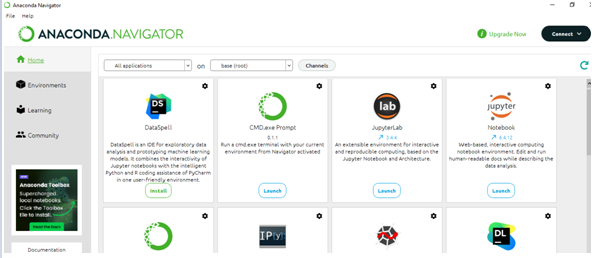
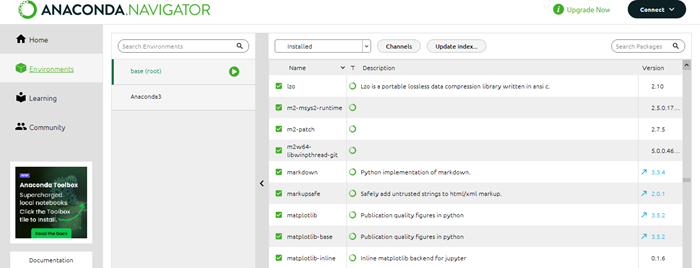
Alternatively, we can open Anaconda Prompt or a terminal and run the below-mentioned code:
conda list matplotlib
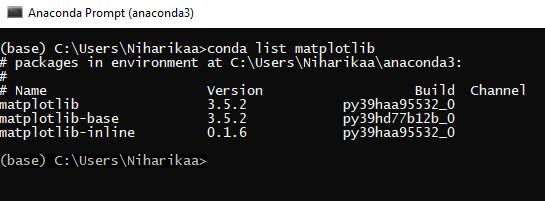
This command will list the installed version of Matplotlib in our current Anaconda environment.
conda install matplotlib
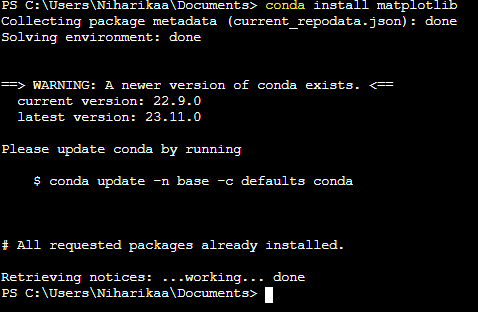
Conda Installation:
As the matplotlib is already installed in the system, it shows the message: All requested packages already installed.
conda update matplotlib
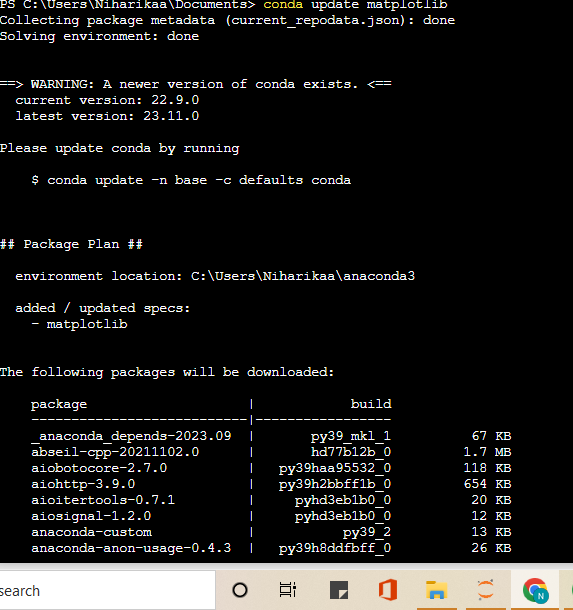
Update Conda:
The above-mentioned commands will manage the installation or update of Matplotlib and its dependencies in our Anaconda environment.
Finally, we can say Matplotlib is a fundamental part of the Anaconda distribution, making it convenient for users to create high-quality visualizations in their Python environments for data analysis and scientific computing.